

<img alt="" src="https://secure.weed6tape.com/193471.png" style="display:none;">
Try Securosys CloudHSM for free. Start your 90-days-trial now

Get started

About
About
Learn more about our mission, explore career opportunities, and access our resources. Discover how we’re shaping the future of cybersecurity and how you can be part of it.
Contact us
  • There are no suggestions because the search field is empty.

What is Securosys 365?

Securosys 365 DKE (Double Key Encryption) is a cloud-based security solution that protects Microsoft 365 data using two encryption keys — one managed by Microsoft and one fully controlled by the customer.

This approach ensures that no third party, including Microsoft, can decrypt sensitive content, providing true data sovereignty and compliance with strict regulatory requirements.

Challenge

Organizations using Microsoft 365 face a growing challenge: how to protect sensitive data while maintaining full control in the cloud. As data breaches become more frequent and regulations stricter, relying solely on cloud providers for encryption is no longer sufficient.

Many organizations struggle to ensure data sovereignty, prevent unauthorized access, and meet compliance requirements — all without adding complexity for end-users.

x-4

Solution

Securosys 365 DKE enables client-side encryption with full customer key ownership, ensuring that sensitive data is protected before it reaches the cloud.

Built on Microsoft Purview Information Protection, the solution adds a second encryption layer controlled exclusively by the customer.

With Double Key Encryption, data is secured using two independent keys: one managed by Microsoft and one stored in Securosys CloudHSM under your control. This guarantees that no third party can access your data.

For users, the experience remains straightforward: applying a sensitivity label in Microsoft 365 automatically triggers encryption without changing existing workflows.


x-4

Key Benefits

shield-tools-locket-b&w
User-Friendly Management Panel
Manage keys, configure settings, and audit cryptographic operations through the Securosys 365 DKE Console.
computer- lock-shield-b&w
Ready to use
Deploy within minutes thanks to a high-availability cloud architecture.

blocks-system-b&w
Seamless Integration with Microsoft Integration
Works natively with Microsoft 365, Azure Information Protection, and Microsoft Purview.
locket-2-b&w
Privacy by Design
Documents are never processed outside Microsoft, only encryption keys are handled securely in the HSM.
shield-b&w
Robust Security and Compliance
Includes 2FA, high availability, and ISO 27001-certified operations for enterprise-grade protection.
Key Differentiators
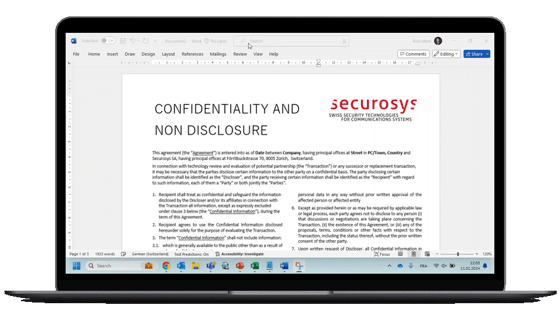
Securosys 365 DKE in action

Fully Managed DKEaaS

Our solution can be deployed in your environment in an hour or less, providing immediate benefits and minimal disruption.

Highest Compliance Standards

Keys are stored on FIPS 140-3 level 3 and Common Criteria EAL4+ validated HSMs. Service operations are ISO 27000 certified, ensuring the highest level of data protection and compliance.

Globally Accessible

Securosys 365 DKE is available 24/7 as a cloud-based service, accessible from anywhere in the world.

Use Cases

colourful-background-patterns-14 Legal Services Protect attorney-client privileged communication and confidential legal documents.
colourful-background-patterns-11 Public Services and Government Ensure confidentiality of citizen data and sensitive government records.
colourful-background-patterns-13 Healthcare and Pharmaceutical Secure patient data, clinical trials, and intellectual property.
colourful-background-patterns-2 Media & Entertainment Protect exclusive content, contracts, and distribution rights.
colourful-background-patterns Defense & Aerospace Safeguard classified data and sensitive engineering information.
Seamlessly integrate Securosys 365 DKE into your existing
environment, ensuring your data remains secure and sovereign.
Step 1
Preparation
Check that you have the right technical infrastructure.
Step 2
Installation (30 min)
Install Azure Information Protection on your environment and link it to your Securosys365 tenant
Step 3
Configuration (1-4 hours)
Create & publish the new sensitivity labels
Contact Sales

FAQ

Why should I do a proof of concept?
A Proof of Concept for Securosys365 ensures a smooth integration, minimal disruption, and alignment with your expectations, allowing you to validate the effectiveness of our security product before widespread implementation within your organization.
What are the steps to install S365?
1.Preparation: 
  • Minimum 50 users
  • Microsoft 365 E5 & Microsoft 365 Office Apps for Enterprise (version 18.2008.12711.0 or later)
  • From 1 to 10 sensitivity label names compliant with your organization's information protection policies. Examples provided in the resources
2. Installation (30 minutes)
3. Configuration (1-4 hours)
  • Log in and retrieve your Securosys365 admin credentials through our support portal
  • Create & publish sensitivity labels in your Azure tenant
  • Test
Can Securosys support me for the installation?

We can offer a 30-minute demo with one of our Senior Product Engineer to address the most common questions.

Unfortunately, we cannot provide consulting resources to work on your infrastructure and perform the installation on your behalf.

However, we would be happy to recommend consulting partners to support you with the installation.

How to kickstart a proof-of-concept for S365?
  • Liaise internaly with the relevant stakeholders. Most likely the CISO
  • Assess the complexity of the solution, the pre-requisites, the technical & human resources needed. Appoint external resources if needed
  • Install Azure Information Protection on your environment and link it to your Securosys365 tenant (30 minutes)
  • Choose and implement security labels (1-4 hours)
  • Run some tests as an end-users on Excel, Word, PowerPoint, Outlook, to cover your most important use cases
What is included in the monthly subscription?

The monthly subscription includes:

  • Infrastructure/hardware costs - Primus HSM, etc.
  • Software costs with continuous improvement
  • Online console to manage your key
  • 24/7 support & maintenance

Not included:

  • Azure & Microsoft desktop App licences
  • Any consulting/training/support for the Proof of Concept PoC & onboarding - We can recommend some partners instead
What are the technical skills needed to install S365?

To install S365, you need to understand the following concepts:

  • Azure Fundamentals
  • Azure Information Protection (AIP)
  • Azure Active Directory (AAD)

which would be most likely CISO, IT Manager/Director, System Administrator, Security Analyst, Security Engineer, Security Architect. They can be supported by Security Consultant, IT Auditor, Data Protection Officer (DPO), Compliance Officer, Risk Manager.

Why does S365 work with Microsoft E5 licences, but not E1 & E3 ones?

Securosys365 works with the Double-Key Encryption (DKE) protocol from Microsoft, which is only included in E5 licences.

If you don't have an E5 licence, Microsoft offers a 30-day free trial here

What happens if I lose access to my documents, or if my Microsoft Office 365 subscription is cancelled?

The data would remain encrypted and could not be used by anyone


What happens to my documents if I unsubscribe from S365?

Before your subscription ends, we recommend the following exit process:

  • Decrypt all your documents and move them to their new location
  • If you have a lot of documents, you can run a PowerShell script to decrypt any DKE-encrypted protected files.

Please contact us at least 1-month before the termination to ensure a smooth exit process.


Microsoft Office already encrypts the data by default. Isn't that sufficient?
While Microsoft Office does include default encryption for data, Securosys365 goes beyond by providing additional layers of security. Our solution not only enhances encryption but also empowers you to control who can encrypt/decrypt data, offering advanced threat detection and customization options tailored to your organization's specific needs. This ensures a comprehensive and customizable approach to safeguarding your sensitive data alongside the default encryption provided by Microsoft Office.
What makes S365 different from other solutions?
Once a sensitivity level is chosen, can I update if to a higher/lower one?
Yes, you can always update sensitivity labels.
Can Securosys decrypt my documents?

No, Securosys cannot access your data because:

  • Securosys doesn't have access to your Azure tenant
  • The decryption is performed on the client's device by the Office Apps
Why choosing multiple sensitivity labels ? Can't we simply have one and apply it to all the data?

Within your organization, you might have different groups of users with different roles & duties. The permissions will be different for each of them.

Thus, you will need a specific sensitivity labels to match each use cases.

What does Securosys365 protect my documents against?
Securosys365 enables you to retain control of your second key and mitigate the following risks:
  • Security vulnerabilities in complex hyperscaler environments
  • Malicious activities by hyperscalers or employees
  • Loss of intellectual property
Additionally, it ensures compliance with GDPR protection laws.
What happens if the key is lost?

If the Securosys365 key is lost, you could not decrypt your data anymore.

However, this risk is being eliminated as your key is stored in an HSM which is redundant.

If a user A leaves the company, can a user B access its documents?
Yes, the MIP admin on customer side simply needs to apply user A's permissions to user B.